




Building a Basic Simulation Model
Building a basic simulation model is often the first step in understanding how discrete event simulation works in practice. With tools like FlexSim™, users can move from a blank workspace to a functioning model that represents how entities flow through a system and interact with resources over time.
At its core, a basic simulation model is designed to answer a simple question: how does work move through a process, and where do constraints begin to appear?
Starting with a Blank Model
A simulation model typically begins with an empty workspace and a predefined set of units, such as length and time. From there, users rely on a library of standard modeling objects to begin assembling the core structure of the system.
This approach allows models to start small and grow in complexity gradually, making it easier to validate logic and understand system behavior.
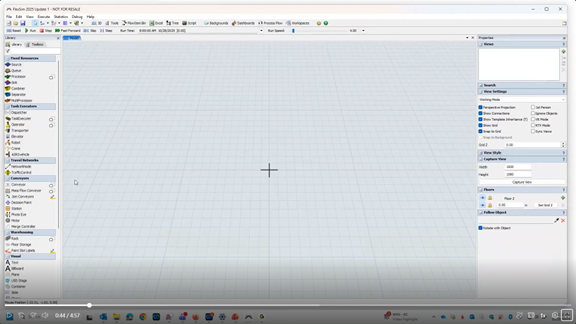
Starting a new FlexSim model in a blank 3D workspace with the object library visible on the left.
Defining the Flow of the System
Many basic simulation models follow a simple, linear flow. Entities are introduced into the system, wait if necessary, are processed, and then exit once work is complete.
Arrival patterns are often defined using statistical distributions to reflect real-world variability. Even when entities arrive on average at regular intervals, natural variation can lead to uneven flow and temporary congestion.
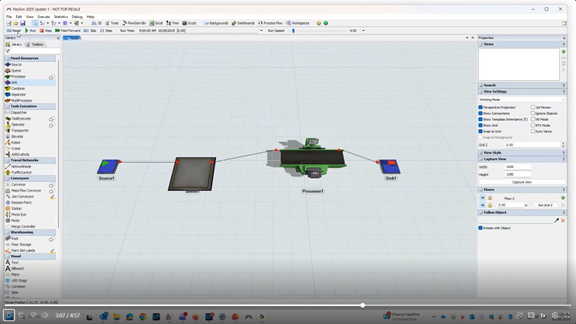
A basic flow is created using a Source, Queue, Processor, and Sink — the minimum building blocks for a working system.
Observing Behavior and Identifying Constraints
Once the model is running, users can adjust the simulation speed and observe how entities move through the system over time. Backlogs may form when arrivals outpace processing capacity, revealing early indicators of bottlenecks or inefficiencies.
These observations help illustrate how variability impacts performance, even in very simple systems.
Adding Resources for Greater Realism
To better reflect real-world conditions, resources such as operators or material handlers can be introduced. When entities require a resource to move or be processed, additional delays may occur, often increasing queue buildup.
This step highlights how staffing levels, equipment availability, and task duration directly influence throughput.
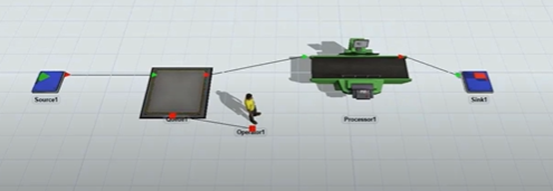
Introducing a worker resource adds realism — and creates additional delay as the person becomes a constraint on throughput.
From Basic Models to Deeper Analysis
While a basic simulation model often relies on default settings, it provides a strong foundation for deeper analysis. Once the logic is established, users can explore alternative configurations, processing times, or resource levels.
Even simple models can generate meaningful insights and support data-driven decisions before changes are implemented in the real world.
Watch the Full Webcast
This article introduces the fundamentals of building a basic simulation model and understanding system behavior through simulation. To see a complete demonstration, explore expanded scenarios, and learn how simulation supports operational decision-making, watch the full webcast.


Comments