




Simulation delivers outsized value when teams can test decisions quickly. FlexSim™ includes a feature purpose‑built for that need: the Experimenter Tool. It enables users to compare multiple “what‑if” scenarios without manually updating system logic or watching every run unfold onscreen.
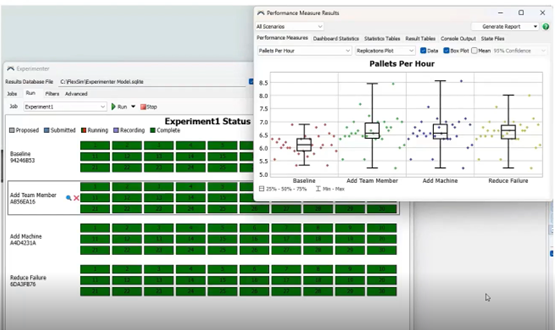
What the Experimenter Does
Rather than animating the 3D model, Experimenter processes logic in the background for significantly faster turnaround. Users can alter inputs such as:
• Staffing and crew levels
• Equipment counts or availability
• Failure or scrap rates
• Routing, timing, or batch rules
With each configuration defined, the tool generates outcomes based on real model behavior—just without the time spent waiting on playback.
Establish a Baseline First
A baseline provides the benchmark for improvement. In many workflows, a single operator, a defined failure rate, and a modest throughput target (such as pallets per hour) establish both constraints and expectations. This allows subsequent experimentation to reveal whether process changes justify investment.
Run Several Scenarios at Once
Experimenter makes iteration easier. Instead of modifying and re‑running the same model repeatedly, users can:
• Create multiple parameter sets
• Define run duration or warm‑up time
• Repeat scenarios to smooth randomness
• Capture statistical ranges and variability
This builds a clearer picture of where meaningful improvements exist—and where the system naturally stabilizes.
Evaluate Improvements Objectively
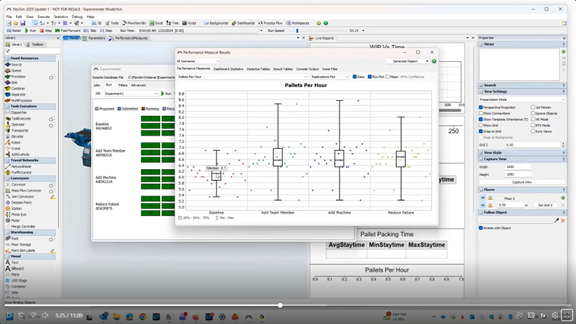
Results are aggregated into medians, ranges, and percentile bands, helping users see:
• Whether performance differences are meaningful or marginal
• How variability increases or tapers when parameters change
• Which actions deliver ROI fastest—labor, equipment, quality, or none
When budget, floor space, or staffing are limited, this helps prioritize the most effective improvements.
Stack Decisions for Bigger Impact
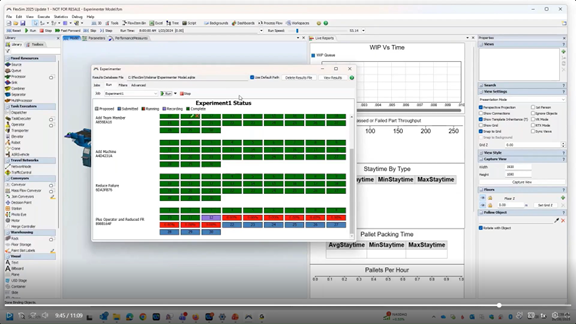
Experimenter also supports multi‑factor tests—adding personnel while reducing scrap, or pairing equipment investment with uptime improvements. These combined scenarios can reveal diminishing returns, synergy, or unexpected similarity to simpler changes.
Model Quality Still Matters
Any simulation is only as trustworthy as its assumptions. Inputs, system behavior, and constraints should reflect reality when decisions or investments ride on results.
Explore more:
FlexSim helps organizations assess process changes before resources are committed. To explore full workflows, scenario design, and evaluation methods, watch the full recording of our presentation, From Bottlenecks to Breakthroughs with Autodesk FlexSim.



Comments