




How Autodesk Fusion Contributor allows teams, suppliers, and stakeholders to participate in workflows without needing full design authoring access.
In modern product development, many people need visibility into design data — but not everyone needs full CAD or PLM authoring tools.
That’s where Autodesk Fusion ® Contributor comes in.
Fusion Contributor is designed to give downstream stakeholders access to project data, workflows, and design information without requiring a full Fusion authoring license. It allows team members to review, collaborate, and participate in workflows from anywhere, on any device.
This makes it an ideal option for project managers, manufacturing teams, suppliers, and other collaborators who need to stay informed and involved in development processes.
Who Should Use Fusion Contributor?
- Engineering managers
- Manufacturing teams
- Quality teams
- Procurement teams
- External suppliers
- Executives who need project visibility
What Is Fusion Contributor?
Fusion Contributor is a collaboration license level that enables stakeholders to participate in development workflows without editing or authoring design data.
- Review design data
- Participate in workflows
- Access project information
- Run reports and dashboards
- Comment and mark up designs
- Approve or review change order
- Users do not have design authoring permissions, meaning they cannot modify CAD models or create designs. Instead, they have consumption and collaboration access to project data and workflows.
How Autodesk Simplified Fusion Licensing
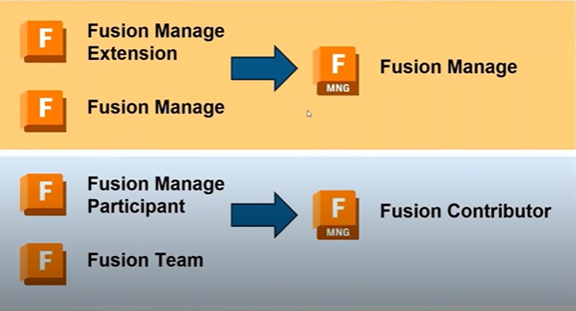
Autodesk recently streamlined parts of the Fusion ecosystem to make collaboration easier.
Previously:
- Fusion CAD included a Fusion Manage Extension
- There was a separate Fusion Manage environment
- Workflow participants used a Fusion Manage Participant license
Today:
- Fusion Manage is now fully integrated
- The old Participant license has been replaced with Fusion Contributor
- Contributor also provides access to Fusion Team for design collaboration
Access to Design Data Through Fusion Team
Fusion Contributor provides access to Fusion Team, Autodesk’s cloud collaboration environment for design data.
- View design files stored in Fusion
- Access centralized project data
- Review version-controlled files
- Collaborate across internal and external teams
Participate in Workflows Without Authoring Tools
- Review change orders
- Approve or reject updates
- Comment on designs
- Mark up files
- Provide feedback during development
Visibility Into Projects, Tasks, and Reports
- Track assigned tasks
- Monitor deadlines
- View project status
- Generate reports and charts
- Analyze workflow progress
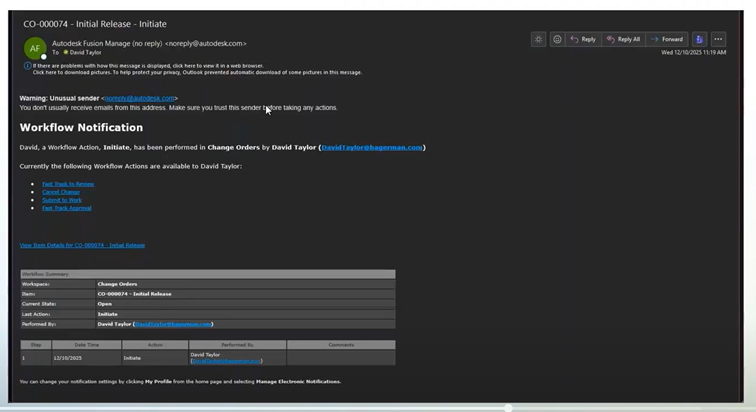
Real-Time Notifications for Workflow Actions
When contributors are part of a workflow—such as reviewing a change order—they receive real-time notifications via email, allowing them to quickly open tasks and approve or comment on requests.
Fast Searching Across Project Data
Fusion Contributor includes fast search tools for locating items, documents, BOMs, change orders, and other project records through a centralized search interface.
Watch the Full Webcast
This article highlights a short segment from our Autodesk Fusion webcast covering licensing changes, collaboration tools, and workflow participation.
Watch the full recording to see how Fusion Manage, Fusion Team, and collaboration workflows work together in real-world product development environments.



Comments